



Added find field for filtering transfer window file lists
Added support for displaying the overall progress and time remaining of multi-file transfers
Added support for preserving the modification date of uploaded files
Added support for syncing shortcuts using Dropbox or a shared file server
Added "Show Fetch.log in Finder" command to simplify support requests
Added automatic removal of trailing spaces from the names of uploaded items
Added more detailed debug logging of SFTP connections
Added preference for skipping over files you do not have permission to download
Added support for Bonjour discovery of FTP with TLS/SSL servers
Added support for editing remote files displayed with Quick Look
Added the ability to upgrade from a serial number for an earlier version
Changed default preference setting to ignore file list cache
Changed system requirements to Mac OS X 10.5 or later on Intel Macs
Changed the meaning of KB, MB, GB, TB units to match the Finder
Fixed "action could not be loaded because it is not Universal" error when adding Get Specified Fetch Items action to Automator workflow
Fixed a problem dragging items from iTunes to Fetch
Fixed a problem quitting while hidden
Fixed a problem that caused the discrete graphics card in late model MacBook Pros to be activated
Fixed a problem where Info windows incorrectly displayed 000 permissions for just-uploaded items
Fixed a problem with file lists on some French FTP servers
Fixed a problem with special characters in passwords
Fixed a problem with stalled uploads
Fixed an incompatibility with an unusually verbose FTP server
Improved appearance on Mac OS X 10.7 Lion
Improved compatibility with AS/400 servers
Improved compatibility with FTP servers with broken MDTM support
Improved compatibility with FTP servers with broken SIZE support
Improved compatibility with GlobalSCAPE SFTP server
Improved compatibility with Mac OS X 10.7 Lion
Improved compatibility with Tectia SFTP servers
Improved compatibility with Windows NT servers
Improved compatibility with some servers by removing automatic use of MacBinary mode transfers
Improved documentation of text file character encodings
Improved handling of SFTP host key changes
Improved reliability of large transfers
Improved support for default preference settings on Mac OS X Server
Improved user interface for first time SFTP connections
Improved warning message for mismatched SFTP host keys
Removed the Fetch Dashboard Widget
0
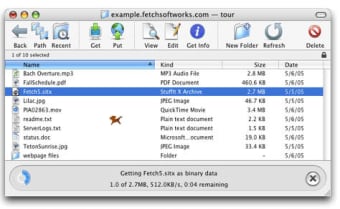
Fetch is a Macintosh program for transferring files over networks, such as the Internet, using the File Transfer Protocol (FTP) or SSH File Transfer Protocol (SFTP). Fetch 5 includes all the standard features of a modern FTP/SFTP client, presented in a user interface that is simple and easy to use.
Fetch is compatible with a wide range of FTP and SFTP servers, from mainframes and high-end servers to Macintosh, UNIX, Windows, and Netware computers, and even servers in prepress systems, image editing systems, photo processing equipment, and medical imaging systems.
Fetch can be used to:

Publish a website at a web hosting provider
Rename, move, delete, and change the permissions of files on a web server in order to maintain a website
Publish images for eBay auction listings
Transfer documents to a printing company or service bureau
Submit advertisements to newspapers and magazines
Move files between your Macintosh and other computers or specialized equipment
Laws concerning the use of this software vary from country to country. We do not encourage or condone the use of this program if it is in violation of these laws.